Should You Self-Host Vaultwarden? An Honest Practitioner’s Take
There’s a particular kind of satisfaction in running your own password manager. You own the data, you own the box, and nobody’s quarterly earnings call depends on your subscription. For a certain sort of person — and if you’re reading a home lab article, you might be that sort of person — that’s reason enough.
But I want to start this one with the part most guides skip: for most people, self-hosting a password manager is the wrong call. Not because it’s hard, and not because Vaultwarden is bad — it’s excellent. It’s the wrong call because a password vault is the single most security-critical thing you own, and the moment you self-host it, you become the security team responsible for protecting it. Most people are better served by paying someone else to do that job well.
This article is for the people who’ve read that, nodded, and want to do it anyway — to learn, to understand the trade-offs properly, and to run something real on their lab. Let’s do it with eyes open.
What Vaultwarden actually is
Vaultwarden is an unofficial, lightweight implementation of the Bitwarden server, written in Rust. It speaks the same API as the official Bitwarden server, which means the official Bitwarden clients — the browser extensions, the mobile apps, the desktop app — all talk to it without knowing the difference. You point them at your own server instead of Bitwarden’s cloud, and everything just works.
It started life as bitwarden_rs before being renamed to avoid confusion with the official project. The key thing to understand is the relationship: Vaultwarden is not made by Bitwarden, and it is not the official self-hosted Bitwarden. Bitwarden offers its own self-hosted option, but it’s a heavy, multi-container stack built for organisations with infrastructure to match. Vaultwarden is the community answer to “I just want this to run on a Raspberry Pi” — and it does, sipping resources where the official stack would gulp them.
There’s a slightly awkward bonus that’s worth being honest about: because Vaultwarden runs on your hardware, it unlocks features Bitwarden charges for — organisations, additional 2FA options, attachments — at no cost. People mention this a lot. I’d gently suggest it’s the least good reason to self-host, and I’ll come back to why.
The honest part: should you actually do this?
Here’s the question that matters, and the answer most affiliate sites won’t give you straight because there’s no commission in it.
If you want a password manager that’s secure, reliable, and that you never have to think about — pay for Bitwarden. The hosted version costs a few dollars a month, it’s run by a dedicated security team, it’s been independently audited, it has a bug bounty programme, and it survives your Raspberry Pi’s SD card dying at 2am. I cover it properly in the best password managers for Australians guide, and it’s the recommendation I give to family without hesitation.
Self-hosting can make you less secure, not more, if you don’t run it well. When you self-host, you take on responsibility for the operating system, the TLS certificate, the backups, the updates, and the network exposure. Get any of those wrong and you’ve taken the most sensitive data you own and put it on a box you’re securing in your spare time. A professionally run cloud service with a security team is, for most threat models, the safer choice — not the riskier one. This is the bit that trips people up: self-hosting feels more secure because the data is “yours,” but feeling and threat model aren’t the same thing.
So why do it at all? Three honest reasons:
To learn. Running Vaultwarden teaches you reverse proxies, TLS, Docker, backups, and remote access — the exact skills the rest of this lab series is built on. That’s the real payoff, and it’s a good one.
For genuine data sovereignty. If you have a specific, considered reason to keep your vault on infrastructure you physically control, self-hosting is the only way to do that. “I’d just prefer it” counts, as long as you’re honest that preference is what’s driving it.
Because you’ll actually maintain it. This is the make-or-break one. Vaultwarden is only as safe as your willingness to keep it patched and backed up. If you know yourself well enough to know that’ll lapse, that’s your answer.
Vaultwarden vs paid Bitwarden — which should you run?
| Vaultwarden (self-hosted) | Bitwarden (hosted) | |
|---|---|---|
| Cost | Free software; ~$5–10/mo for the hardware and power | A few dollars/month for Premium |
| Who secures it | You | A dedicated security team |
| Audited | Community project, no formal audit | Independently audited, bug bounty |
| Backups | Your job, entirely | Handled for you |
| Uptime | As good as your SD card and your power | Enterprise-grade |
| Premium features | Unlocked (you’re the server) | Paid tier |
| Data location | Wherever your box is | Bitwarden’s cloud |
| Best for | Learning, sovereignty, tinkerers | Everyone who just wants it to work |
The honest read of that table: the only columns where Vaultwarden clearly wins are the ones a tinkerer cares about. The columns that protect you when things go wrong all favour the hosted service. If you’re choosing between them on security grounds alone, paid Bitwarden wins for the vast majority of people. Vaultwarden wins when learning and control are the point.
What you need to run it
If you’re going ahead, here’s the honest shape of the build. None of it is exotic, but all of it matters.
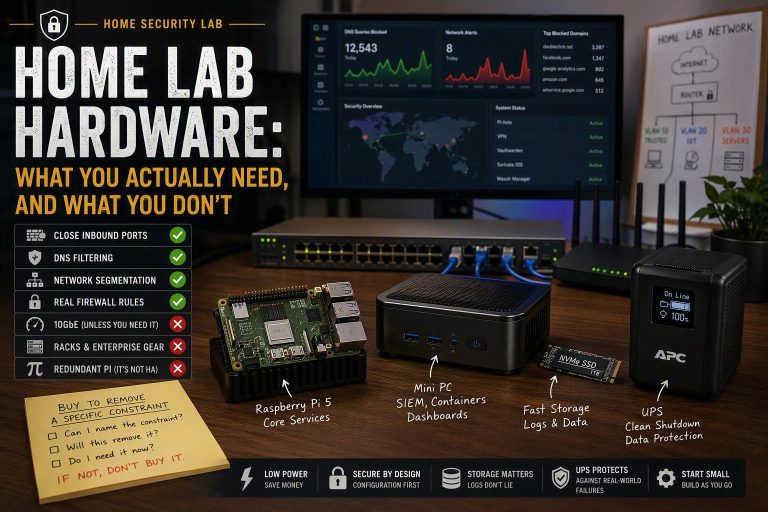
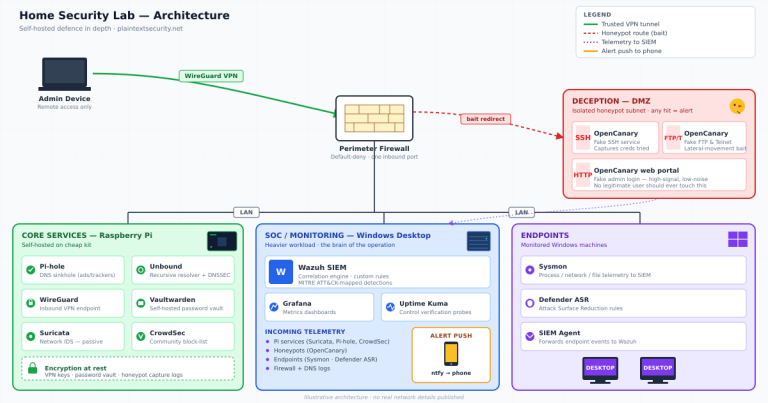
A small always-on machine. A Raspberry Pi 4 is the classic choice and more than enough — Vaultwarden’s resource footprint is tiny. This is the hardware layer, and it’s the cheap part: a Pi, a decent SD card (or better, an SSD), and a power supply. I walk through the lab hardware choices in the home security lab guide. Don’t overthink the hardware; it’s the least important decision here.
Docker. Vaultwarden is almost always run as a container. It keeps the install clean, makes updates a one-line affair, and isolates it from the rest of the system. If you’ve never used Docker, this project is a genuinely good first reason to learn it.
A reverse proxy with real TLS. This is non-negotiable, and it’s the part people get wrong. The Bitwarden clients require a secure context — they won’t store your vault over plain HTTP. You need a reverse proxy (Caddy is the gentlest for beginners because it handles certificates automatically; Nginx and Traefik are common too) terminating a valid HTTPS certificate. No valid certificate, no working vault. Treat this as a requirement, not a nice-to-have.
A backup plan you’ve actually tested. I’ve put this in the “what you need” list deliberately, because it is not optional and it is the thing people skip. More on it below.
The security reality nobody puts in the marketing
This is the practitioner part — the bit I’d want a friend to understand before they trusted this with their logins.
The reassuring fact first: Vaultwarden stores your vault encrypted, and the encryption happens on your device before the data ever reaches the server. Your master password never touches the server in a form the server can read. This means that even if someone steals the entire database off your box, what they get is an encrypted blob, not a list of your passwords. That’s a genuinely strong property, and it’s the same client-side encryption model the official Bitwarden uses.
But “the database is encrypted at rest” is not the same as “self-hosting is safe,” and here’s where the honesty has to hold:
You are now the attack surface. A compromised server is a serious problem even with client-side encryption. If an attacker controls your server and you use the self-hosted web vault, they’re in a position to tamper with what gets served to your browser — and the web vault is where your master password is entered. The desktop and mobile apps and browser extensions are safer here than the web vault precisely because they’re not served fresh from your box each time. Practitioner habit: lock down the admin interface, and lean on the native apps over the web vault.
Your updates are your responsibility. When a vulnerability is found in Vaultwarden or its dependencies, nobody patches your box but you. A self-hosted vault that hasn’t been updated in eight months is a liability dressed up as a hobby.
Exposure is the big lever. The single biggest decision you’ll make is whether this is reachable from the public internet at all. The safest answer for a home setup is no — keep it on your home network and reach it remotely through a VPN rather than opening a port to the world. That single choice removes most of the internet-facing risk in one move. (That’s the subject of the next article in this series — a self-hosted WireGuard VPN is exactly how you reach a vault like this from your phone without exposing it.)
None of this is meant to scare you off. It’s meant to make sure that if you do this, you do it as the operator you’re now signing up to be — not as someone who installed an app and assumed the safety came in the box.
Backups are the whole game
I’ll say this plainly: if you self-host your password vault and you don’t have tested, off-device backups, you don’t have a password manager — you have a time bomb.
The failure mode is mundane and common. SD cards die. Power supplies fail. A botched update corrupts something. And unlike a forgotten Netflix login, the data you lose here is every credential you own. With hosted Bitwarden this simply isn’t your problem. Self-hosted, it’s your first problem.
The discipline is straightforward even if the tooling varies: take regular automated backups of the Vaultwarden data, store at least one copy somewhere that isn’t the Pi itself, and — this is the part people skip — actually restore from a backup once to prove it works. A backup you’ve never tested is a hope, not a backup. Get this right and self-hosting goes from reckless to reasonable. Get it wrong and the first bad day is also your last.
The Australian angle
Why does any of this land differently here? Two reasons worth naming.
The first is sovereignty. Self-hosting keeps your vault on infrastructure you physically control, in your home, on your terms. For some people that’s a meaningful answer to “where does my most sensitive data actually live.” It’s worth being clear-eyed about what that does and doesn’t buy you, though — the same way I was about VPNs in the best VPN for Australia guide. Self-hosting changes who holds the encrypted data; it doesn’t make you invisible, and it doesn’t change the fact that the encryption protecting your vault is the same whether Bitwarden hosts it or you do.
The second is the maintenance reality. Sovereignty is only worth something if the thing is well run. A self-hosted vault on a neglected, internet-exposed box isn’t a privacy win — it’s a worse outcome than the cloud service you were trying to avoid. The privacy benefit and the security responsibility come as a pair. You don’t get one without the other.
The bottom line
Vaultwarden is a genuinely brilliant piece of software, and running it is one of the most rewarding projects in a home lab. It’ll teach you Docker, reverse proxies, TLS, backups, and secure remote access — the foundations everything else in this series builds on.
But be honest with yourself about which person you are. If you want a password manager — just get Bitwarden. Pay the few dollars, let their security team carry the risk, and spend your weekend on something else. There’s no shame in it; it’s the recommendation I give to the people I care about most.
If you want to learn — and you’ll commit to the backups and the updates — self-host Vaultwarden. Keep it off the public internet, reach it through a VPN, test your restores, and enjoy running real infrastructure that does a real job. Just keep a paid vault as your fallback while you find your feet. The best way to learn this is from a position where a mistake costs you a weekend, not your entire credential set.
Self-hosting a password manager is a fantastic way to understand security. It’s a riskier way to do security. Know which one you’re signing up for, and you’ll get the good version of this either way.
Plain Text Security earns affiliate commissions when you sign up for products through links on this site, including Bitwarden. This never changes which tools I recommend — I’ve recommended free and self-hosted options over paid ones throughout this very article. See the full affiliate disclosure for details.