Passkeys in Australia: What Actually Supports Them, and Should You Switch?
If you looked into passkeys a year or two ago and concluded they weren’t ready, that was a reasonable call at the time. It isn’t anymore — and the reason has nothing to do with marketing. A specific technical objection that used to be legitimate has been resolved, quietly, in the last few months.
But the other half of the question — what in Australia actually accepts a passkey? — has an answer that most of the internet is getting wrong. I checked, and several sites currently claim all four major Australian banks support passkeys. Three of them don’t.
Here’s the accurate picture.
What a passkey actually is
Strip away the branding and a passkey is a cryptographic key pair. When you create one, your device generates two mathematically linked keys. The public key goes to the service you’re signing in to. The private key never leaves your device or your password manager.
To sign in, the service sends a challenge. Your device signs it with the private key and sends the signature back. Nothing reusable ever crosses the network.
Two consequences matter more than anything else vendors will tell you:
A passkey can’t be phished. It’s cryptographically bound to the real domain. A convincing fake version of your bank’s login page cannot trigger your passkey, because the passkey simply isn’t valid for that domain. Compare that to an SMS code or an authenticator app code, both of which you can be socially engineered into typing into the wrong site.
A passkey can’t be reused after a breach. There’s no shared secret sitting in a database waiting to be dumped. The service only ever holds a public key, which is useless to an attacker.
That second point is where the Australian context gets pointed.
Why this matters more here than you’d think
In 2025, security researchers at Dvuln found more than 31,000 sets of Australian banking credentials circulating among criminals — roughly 14,000 Commonwealth Bank customers, 7,000 ANZ, 5,000 NAB and 4,000 Westpac.
The important detail: those weren’t stolen from the banks. They came from infostealer malware running on customers’ own devices, quietly harvesting saved passwords from browsers.
The Australian Signals Directorate’s most recent Annual Cyber Threat Report logged over 84,700 cybercrime reports, a large share involving stolen credentials.
Passwords are the thing being stolen. That’s the argument for passkeys in one sentence.
I’ll come back to the honest limitation of this — infostealers don’t stop being a problem just because you switched — but the class of attack that dominates Australian fraud is credential theft followed by reuse, and passkeys break that chain properly.
The objection that used to be valid
The strongest reason to wait was lock-in.
Until recently, a passkey created in Apple’s ecosystem lived in Apple’s ecosystem. One created in Google Password Manager stayed there. There was no safe way to move passkeys between providers — the only export mechanism most password managers offered was a CSV file, which for passkeys was both technically inadequate and a genuinely terrible idea for anything sensitive.
That was a real objection. Committing your entire authentication story to a vendor you can’t leave is bad practice, and I said so at the time.
It’s been fixed. The FIDO Alliance developed two specifications — the Credential Exchange Format and the Credential Exchange Protocol — that define a standard way to move credentials between managers, encrypted end to end rather than dumped to a plaintext file.
More importantly, they shipped:
- Apple implemented the protocol in iOS 26 and macOS 26, enabling direct app-to-app transfer of passkeys and passwords.
- Android added support through a Google Play Services update, covering import and export on current devices.
- Bitwarden was the first third-party password manager to support it. 1Password, Dashlane and Proton Pass are adopting it.
So the “you’ll be trapped” argument has largely expired. It’s worth knowing it was true, because it explains why so much of the advice still floating around says wait.
What actually supports passkeys in Australia
This is the part that’s hard to find accurately. Announcements get reported as launches, and aggregator sites copy each other.
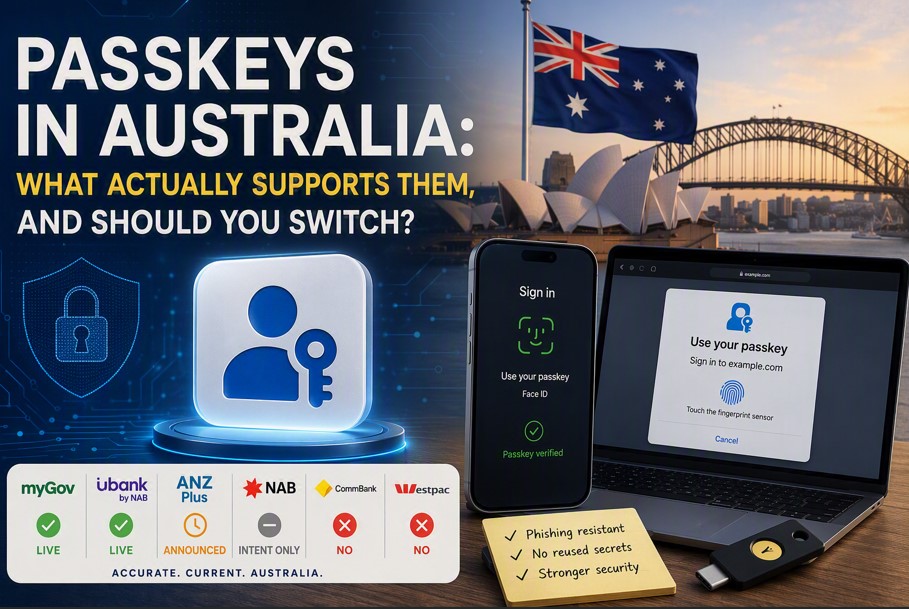
| Service | Passkey support | Notes |
|---|---|---|
| myGov | Live | Among the first government platforms worldwide. Covers ATO, Centrelink, Medicare access. Real limitations — see below. |
| ubank (NAB-owned) | Live, app and web | First Australian bank to offer passkeys, and still the only one across both mobile and online banking. |
| ANZ Plus | Announced | ANZ announced password-less web banking for its digital platform from mid-2025. Verify current status before relying on it. |
| NAB (main) | Intent only | Publicly plans to phase out internet banking passwords, on a multi-year timeline. Nothing live for retail customers. |
| Commonwealth Bank | No | NetBank multi-factor authentication is app push confirmation or SMS. No passkey option. |
| Westpac | No | No announced passkey support for internet banking. |
| Google, Microsoft, Apple accounts | Live | Well supported, and the highest-value accounts to secure first. |
| Most major SaaS | Live | GitHub, Atlassian, Dropbox, AWS, PayPal and similar. Coverage is now the norm rather than the exception. |
The pattern is worth naming. In Australia, passkey adoption is being led by the federal government and a digital challenger bank, while the three largest retail banks are still on app confirmation or SMS codes. That’s close to the opposite of what you’d expect.
If your mental model was “the banks will get there before the government does,” it’s backwards.
The myGov details nobody mentions
myGov’s passkey support is genuinely good, and it has two constraints that will catch people out.
You get three passkeys, maximum. That’s a hard cap per account. It sounds generous until you consider a phone, a laptop, a tablet and a hardware key — you’ll hit it. If you use a synced passkey stored in a password manager, one passkey covers every device signed in to that manager, which is the sensible way to spend the budget.
Removing your last passkey can unlink the ATO. This is the sharp edge. The ATO and the NDIS require a stronger second factor than secret questions. If you delete your last passkey and secret questions are your remaining sign-in method, those services will unlink from your myGov account.
Practical implication: keep a second strong sign-in method configured before you start deleting anything. And if you’re using a hardware security key as your passkey, register more than one, because losing your only key is a recovery problem you don’t want with the ATO.
There’s also a housekeeping trap. Deleting a passkey from myGov doesn’t delete it from your device or password manager. Leave the orphaned credential behind and you’ll hit confusing errors next time you try to create one.
Where passkeys don’t help
Every technology piece should have this section, and vendor material never does.
Passkeys don’t fix a compromised device. This is the big one, and it’s directly relevant to those 31,000 stolen Australian banking credentials. Those came from malware on customer machines. If an attacker has that level of access to a device where your password manager is unlocked, passkeys are not a magic shield. They defeat phishing and credential reuse, not full device compromise. Patching, not authentication, is the control that addresses that.
Account recovery becomes the weakest link. Once you can’t be phished at login, attackers move to the recovery flow — and if that’s still “SMS a code to the mobile number on file,” you’ve fortified the front door and left the side gate open. SIM-swap and phone-porting fraud is an established problem in Australia. Passkeys raise the value of hardening recovery, they don’t do it for you.
Shared and older devices are awkward. Services Australia’s own guidance notes passkeys may not suit people on older hardware or public and shared computers. If you regularly sign in from a machine you don’t control, keep a workable alternative.
Coverage is still patchy. As the table shows, if you bank with CommBank or Westpac, passkeys currently do nothing for your bank account — the single account most people most want protected.
What I’d actually do
Store passkeys in a password manager, not in a single platform’s keychain. This is the practitioner answer and it’s about avoiding a structural problem rather than about any product. If your passkeys live in Apple’s keychain and you use a Windows work laptop and an Android phone, you’ve built yourself a daily friction problem. A cross-platform manager holds passkeys and passwords together and works everywhere. Now that the exchange protocol has shipped, you can also leave whichever one you pick — which is what makes committing to one reasonable at all.
Start with the accounts that unlock other accounts. Your email account is the master key to almost everything you own, because password resets land there. Secure that first, then myGov, then anything financial that supports it. Working alphabetically through your vault is a waste of a Saturday.
Add a passkey, don’t immediately remove the password. Run both for a few weeks. Confirm the passkey works on every device you actually use before you burn the fallback. On myGov specifically, check what you’d have left before removing anything.
Harden your recovery options at the same time. Wherever a service allows something better than SMS for account recovery, take it. This is the step people skip and it undoes much of the benefit.
Don’t wait for your bank. You can’t make CommBank support passkeys. You can secure your email, your myGov and your Google or Microsoft account this week, and those are collectively a larger part of your exposure than internet banking is.
The verdict
Yes, adopt passkeys — with the caveat that in Australia in 2026 you’re adopting them account by account, not all at once.
The portability objection that justified waiting has been resolved. Support at the accounts that matter most — email, myGov, the major platform accounts — is solid. The gap is retail banking, where three of the big four haven’t moved, and that’s a reason to be selective rather than a reason to sit out.
The thing that would change my advice is if account recovery flows stay stuck on SMS while login gets hardened. That’s where attention will move, and it’s worth watching.
If you’re deciding where to keep passkeys, that’s really a password manager decision, and I’ve written separately about which password manager is worth using. For the enterprise version of this same control, phishing-resistant multi-factor authentication is where passkeys meet the ASD Essential Eight.
This article contains no affiliate links. Where I recommend a product elsewhere on this site and earn a commission, it’s disclosed — see the affiliate disclosure.